
How Do You Test Chatbot Buttons and Quick Replies?
Test Chatbot Buttons and Quick Replies
Testing chatbot buttons and quick replies is an essential part of ensuring a seamless and efficient user experience. These elements are designed to guide users through conversations, making interactions smoother and more intuitive. Unlike free-text inputs, buttons and quick replies provide structured responses, reducing ambiguity and improving chatbot accuracy. However, for them to function correctly, they must be rigorously tested across various scenarios.
One of the primary aspects of testing chatbot buttons and quick replies is verifying their functionality. Each button must trigger the correct response or action, leading users to the intended path in the conversation flow. This involves systematically clicking every button and observing whether the chatbot reacts as expected. If a button fails to work, it can disrupt the entire user journey, leading to frustration and potential abandonment. Ensuring that every button directs the conversation appropriately is crucial for maintaining user engagement.
Consistency across different platforms is another key consideration in chatbot button testing. Chatbots are often deployed on multiple messaging apps, such as Facebook Messenger, WhatsApp, Telegram, and websites. Each platform may render buttons and quick replies differently, affecting their visibility and usability. Testing across various platforms helps identify inconsistencies and ensures that users have a uniform experience regardless of where they interact with the chatbot. Responsive design testing is also necessary to confirm that buttons and quick replies display correctly on different screen sizes, including mobile devices, tablets, and desktops.
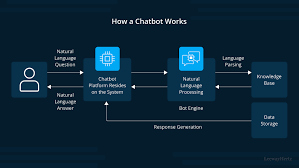
How Do You Test Chatbot Buttons and Quick Replies?
Edge cases and unexpected user behavior must also be taken into account during testing. Users may click buttons in rapid succession, select unintended options, or even attempt to bypass buttons with manual input. The chatbot should be tested for these scenarios to ensure it handles them gracefully. For example, if a user selects an option and then quickly selects another, the chatbot should be able to manage multiple inputs without crashing or getting stuck in a loop. Similarly, if a user types a response instead of clicking a quick reply, the chatbot should still be able to continue the conversation smoothly.
Integration testing plays a crucial role in validating Al-powered chatbot and voice assistant testing, especially if they trigger external actions such as API calls, database updates, or third-party service integrations. When a button is meant to fetch data, complete a transaction, or update user preferences, it should be tested to confirm that it successfully communicates with the backend systems. Any failure in these integrations could result in broken functionality, leading to a poor user experience. Automated testing tools can simulate user interactions to verify that button-triggered actions execute correctly across different scenarios.
Another important aspect of chatbot button testing is usability evaluation. While buttons and quick replies should function correctly, they must also be intuitive and user-friendly. Testing should assess whether users can easily understand the button labels, whether the options are logically arranged, and whether they provide a clear path forward in the conversation. A/B testing can be useful in comparing different button designs and placements to determine which versions yield the best engagement and conversion rates.
By thoroughly testing chatbot buttons and quick replies, developers can ensure a smooth, intuitive, and error-free user experience. Functionality, platform consistency, edge case handling, integration validation, and usability testing are all crucial aspects of this process. Proper testing not only enhances chatbot reliability but also improves user satisfaction, making interactions more engaging and efficient.